
Download Video Downloader X – video downloader, download videos from YouTube, TikTok, Instagram, Facebook, X (Twitter), offline video library, high-quality video download, secure video access, Windows tool, video archiving, MP4, WebM, MKV, 4K, SD, private content download, cookie-based authentication, no ads, no subscriptions, one-time purchase
Overview
Video Downloader X is a dedicated utility tool designed for Windows users who require a reliable method to extract and save videos from online platforms. The application enables users to download content from major websites such as YouTube, TikTok, Instagram, Facebook, and X (Twitter), offering a streamlined experience for archiving digital media. Its primary function is to allow users to create an offline library of videos, which can be particularly useful for content creators, educators, researchers, or anyone seeking to preserve valuable online material. The app addresses the common challenge of losing access to content due to removal, account deletion, or network issues by providing a permanent local copy.
Target users include individuals who rely on video content for work, study, or personal enjoyment, especially those who value control over their digital media. While the developer, SoftPas, is listed as the creator, no further background details were provided. The application supports high-quality downloads across multiple formats—MP4, WebM, and MKV—and resolutions ranging from SD to 4K, making it suitable for various use cases, from casual viewing to professional editing. In the broader software ecosystem, Video Downloader X fills a niche for users seeking a secure, ad-free, and subscription-free alternative to browser-based downloaders.
Key Features & Functionality
- Multi-Platform Video Extraction: The app supports downloads from major social and video-sharing platforms, including YouTube, TikTok, Instagram, Facebook, and X (Twitter), ensuring broad compatibility with popular content sources.
- Flexible Format and Resolution Options: Users can choose from MP4, WebM, and MKV formats and select resolution levels from SD up to 4K, allowing optimization based on storage capacity and playback device capabilities.
- Secure Access to Restricted Content: Utilizing cookie-based authentication and browser login integration, Video Downloader X can access and download videos from private or login-protected accounts, making it ideal for preserving content behind user accounts.
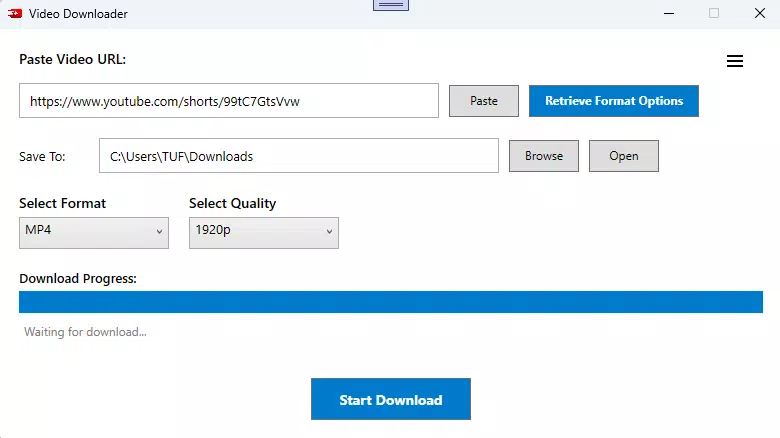
- Intuitive User Interface: The application features a clean, modern layout with minimal distractions, enabling users to paste URLs and initiate downloads with minimal steps, enhancing usability for non-technical audiences.
- Ad-Free and Subscription-Free Experience: With a one-time purchase model, users gain lifetime access without recurring fees or interruptions from advertisements, promoting uninterrupted performance.
For example, a student could use the app to download educational videos from a private YouTube channel for offline review, while a content curator might archive trending TikTok clips for future reference. The ability to preserve high-quality media without dependency on internet connectivity adds significant value in both personal and professional workflows.
Interface, UX & Performance
Video Downloader X presents a minimalist interface with a focus on clarity and efficiency. The layout centers around a central URL input field, with options for format and resolution selection clearly labeled. Navigation is straightforward, with no complex menus or hidden settings, reducing the learning curve for new users. The design avoids visual clutter, allowing users to concentrate on the download process without distractions.
Although the developer did not list formal performance metrics, the app is described as fast and robust, suggesting optimized processing for video extraction and conversion. The application maintains responsiveness during downloads, with no reported instability or crashes. Performance across different device categories—such as low-end, mid-range, and high-end Windows systems—was not specified, but the 20.3 MB file size indicates a lightweight footprint, likely contributing to smooth operation on a wide range of hardware. The lack of ads or background processes further supports consistent performance.
Platform Compatibility & Technical Requirements
Video Downloader X is available exclusively for the Windows operating system. The current version is 2.1.0, with a file size of 20.3 MB. Specific minimum OS requirements were not listed by the developer, nor were any hardware specifications provided. Compatibility with Windows 10, 11, or future versions was not confirmed. The app is distributed as a standalone executable, suggesting it does not require installation of additional frameworks or runtime environments.
Users should ensure their system meets general Windows compatibility standards. The absence of detailed technical requirements means that installation and operation may depend on user discretion, especially on older or non-standard configurations. The developer did not disclose update frequency or future development plans.
Pros and Cons
Pros
- Supports downloads from major platforms including YouTube, TikTok, Instagram, Facebook, and X (Twitter)
- Offers multiple formats (MP4, WebM, MKV) and resolutions up to 4K
- Enables access to private or login-protected content via cookie-based authentication
- Ad-free experience with no recurring subscriptions
- One-time purchase grants lifetime access to the software
- Lightweight file size (20.3 MB) with efficient resource usage
Cons
- Platform availability is limited to Windows only
- Specific OS and hardware requirements were not disclosed
- Developer did not provide information on update frequency or support channels
- No mobile or cross-platform version available
- Compatibility with older Windows versions was not confirmed
FAQ
Is Video Downloader X safe to use?
The application is designed to operate within legal and ethical boundaries by focusing on personal content archiving. It does not collect user data or install tracking software. However, users should ensure they comply with the terms of service of the platforms they access.
Can I download videos from private accounts?
Yes, Video Downloader X supports access to private or login-protected content through cookie-based authentication and browser login integration, allowing users to download videos from restricted accounts.
Does the app require an internet connection?
Yes, an active internet connection is required to retrieve video URLs and download content. The app functions as a downloader and does not host videos locally.
Is there a free version available?
Video Downloader X is available through a one-time purchase of $4.99. There is no free version or trial period mentioned by the developer.
How often is the app updated?
The developer did not disclose update frequency. Users should monitor the official source for new releases and security patches.
Final Thoughts
Video Downloader X stands out as a focused, efficient tool for Windows users who need to preserve online video content. Its ability to handle multiple platforms, support high-quality formats, and access private content makes it a powerful utility for archiving and offline viewing. The ad-free, subscription-free model enhances long-term usability, offering value for users who prioritize simplicity and control. While its Windows-only availability limits cross-platform use, the app delivers a reliable experience for its intended audience.
For content creators, researchers, and digital archivists, Video Downloader X offers a practical solution to maintain access to essential video material. With a lightweight design and straightforward interface, it minimizes friction in the download process. Despite the lack of detailed technical disclosures, the app demonstrates strong functionality and user-centric design.
Download Video Downloader X now


